Tutorial: Running superhex
In this tutorial, you will learn how to run superhex using example files from the tests directory.
Step 1: Create a Working Directory
First, create a directory (named example here) outside the code directory, and navigate into it:
$ mkdir example
$ cd example
Step 2: Copy the Example Files
Copy the required example files from the tests directory in the superhex code:
$ cp superhex_dir/tests/bulk_examples/MnTe/input.txt .
$ cp superhex_dir/tests/bulk_examples/MnTe/MnTe.vasp .
Step 3: Understand the Required Input Files
To run superhex, you only need:
An input file (in JSON format), named input.txt.
A structure file (in VASP, CIF, or other formats).
You can find both of these files in the MnTe directory.
To view the contents of the input.txt file, run:
$ cat input.txt
Here’s an example of what the input.txt file might look like:
{
    "structure_file": "MnTe.vasp",
    "LatDim": 3,
    "range_volume": true,
    "volumes": [1, 12],
    "magnetic_atoms": ["Mn"],
    "cutoff_radius": 25,
    "n_configs": 100,
    "all_configs": false,
    "verbosity": "high",
    "seed": 42,
    "num_processes": 4
}
For more details on the input file format, refer to the Input File Format.
Step 4: Run the superhex Program
Run the superhex program in the example directory:
$ superhex
After the run, the following output files will be generated:
log.txt
struct_analysis.csv
A supercells directory containing the generated supercells.
The program indexes each supercell structure by cell volume (denoted as m). For each supercell volume, multiple distinct structures can be generated. These structures are indexed by n, starting from 0 and incrementing to the total number of unique structures for that specific supercell volume.
Within the supercells directory, the files are named as: cell-vol m -num n.vasp, where:
- m represents the supercell volume, and
- n is the structure index.
The log.txt file contains information about the matrix transformations applied to each supercell structure. The details are labeled in the following format:
`
-----volume: m Structure number: n-----
`
Here, m indicates the supercell volume, and n refers to the structure index.
The file struct_analysis.csv contains all the necessary information for selecting an appropriate supercell for exchange calculations.
For this example, the first 30 lines of struct_analysis.csv are shown below:
struct_vol |
struct_num |
first_dep_col_ind |
permitted_farthest_J |
rank |
independent_configs |
latt_abc_var |
|---|---|---|---|---|---|---|
12 |
27 |
14 |
J13 |
14 |
100.0 |
5.48660820765528 |
12 |
30 |
14 |
J13 |
14 |
100.0 |
8.561867272534236 |
12 |
29 |
12 |
J11 |
13 |
100.0 |
1.1947062536820172 |
12 |
13 |
12 |
J11 |
13 |
100.0 |
1.5658469808176523 |
12 |
52 |
12 |
J11 |
14 |
100.0 |
1.6380627038863593 |
12 |
10 |
12 |
J11 |
13 |
100.0 |
5.092097760571457 |
12 |
9 |
12 |
J11 |
13 |
100.0 |
5.092097762909088 |
12 |
14 |
12 |
J11 |
13 |
100.0 |
5.486608232560253 |
12 |
39 |
12 |
J11 |
12 |
100.0 |
6.523325306631343 |
12 |
38 |
12 |
J11 |
12 |
100.0 |
6.982827312743242 |
12 |
15 |
12 |
J11 |
13 |
100.0 |
8.938539139193637 |
12 |
51 |
12 |
J11 |
14 |
100.0 |
12.412728808133906 |
12 |
12 |
12 |
J11 |
13 |
99.0 |
8.56186722167447 |
12 |
63 |
11 |
J10 |
11 |
100.0 |
0.021529503320156757 |
12 |
62 |
11 |
J10 |
12 |
100.0 |
4.348528867033482 |
12 |
64 |
11 |
J10 |
11 |
100.0 |
4.629240448747081 |
12 |
58 |
11 |
J10 |
12 |
100.0 |
7.473741449396445 |
12 |
65 |
11 |
J10 |
11 |
98.0 |
0.7051904465636488 |
10 |
8 |
10 |
J9 |
11 |
100.0 |
4.215876318344207 |
10 |
7 |
10 |
J9 |
11 |
100.0 |
6.834263957520261 |
10 |
22 |
10 |
J9 |
12 |
99.0 |
7.810875500802208 |
10 |
21 |
10 |
J9 |
12 |
98.0 |
0.15689188263818932 |
11 |
13 |
10 |
J9 |
12 |
100.0 |
0.23654027233190766 |
11 |
12 |
10 |
J9 |
12 |
100.0 |
1.6380626780132612 |
11 |
8 |
10 |
J9 |
12 |
100.0 |
4.215876344289669 |
11 |
7 |
10 |
J9 |
12 |
100.0 |
8.918310525742298 |
11 |
11 |
10 |
J9 |
12 |
100.0 |
8.938539097782323 |
11 |
14 |
10 |
J9 |
12 |
100.0 |
10.79158684628348 |
12 |
41 |
10 |
J9 |
10 |
100.0 |
4.629240441738239 |
The first column represents the supercell size (or volume), denoted as
m.The second column indicates the structure number within this volume, denoted as
n.The third column shows the index of the first dependent column of matrix \(\mathbb{A}\), introduced in the introduction.
The fourth column specifies the farthest permitted Heisenberg exchange interaction that can be calculated for the structure with volume
mand structure indexn.The fifth column represents the rank of matrix \(\mathbb{A}\).
The sixth column shows the percentage of independent magnetic configurations generated from random configurations.
The final column indicates the variation in lattice vectors.
You can use the plot_analysis.py script in the src/tools directory to visualize the data from struct_analysis.csv:
python plot_analysis.py
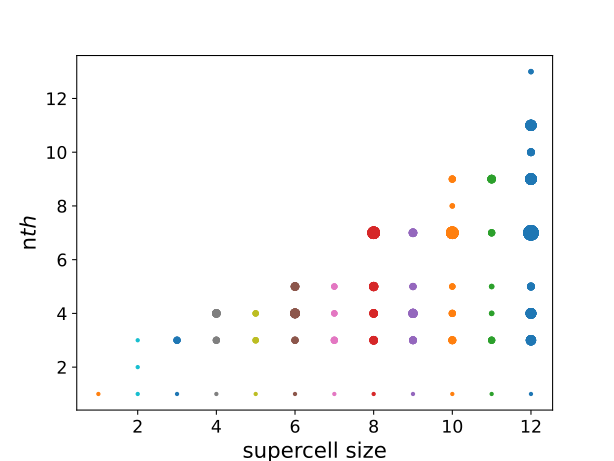
The resulting plot shows the allowed exchange interactions for supercell structures with sizes ranging from 1 to 12. The x-axis represents the supercell sizes, while the y-axis indicates the number of permitted exchange interactions for each structure. Each supercell size includes several distinct structures. For example, at supercell size 8, there are 34 unique supercell structures. The size of the circles in the plot reflects the number of structures that allow the calculation of a specific number of exchange interactions.
According to the plot, if we want to calculate exchange interactions up to the 7th nearest neighbor (i.e., ( J_1, J_2, dots, J_7 )), we can use a supercell of size 8. There are several distinct structures of size 8 that allow the calculation of exchanges up to ( J_7 ).
To find the options, we can use the grep command in bash:
grep J7 struct_analysis.csv
The first few lines of the result are as follows:
8,2,8,J7,9,98.0,22.485831549654435
8,13,8,J7,9,97.0,5.090066901962643
8,8,8,J7,9,96.0,8.996710197481613
8,19,8,J7,9,96.0,21.242606279366886
8,7,8,J7,9,95.0,5.090066954230983
This shows that we can choose, for example, cell-vol8-num2.vasp from the supercells directory for calculating exchange interactions up to ( J_7 ).